A hands-on OpenZiti 2.0 course · by Girish Reddy
Enterprise Zero Trust Architecture with OpenZiti 2.0
You build a zero-trust network for a fictional company, step by step, so that each person reaches only the apps they're allowed to use, and nothing else.
By the end, you can design, build and run a zero-trust network that keeps working when a controller or a whole region fails, and upgrade it while traffic keeps flowing.
Watch a free YouTube lessonWhat you build
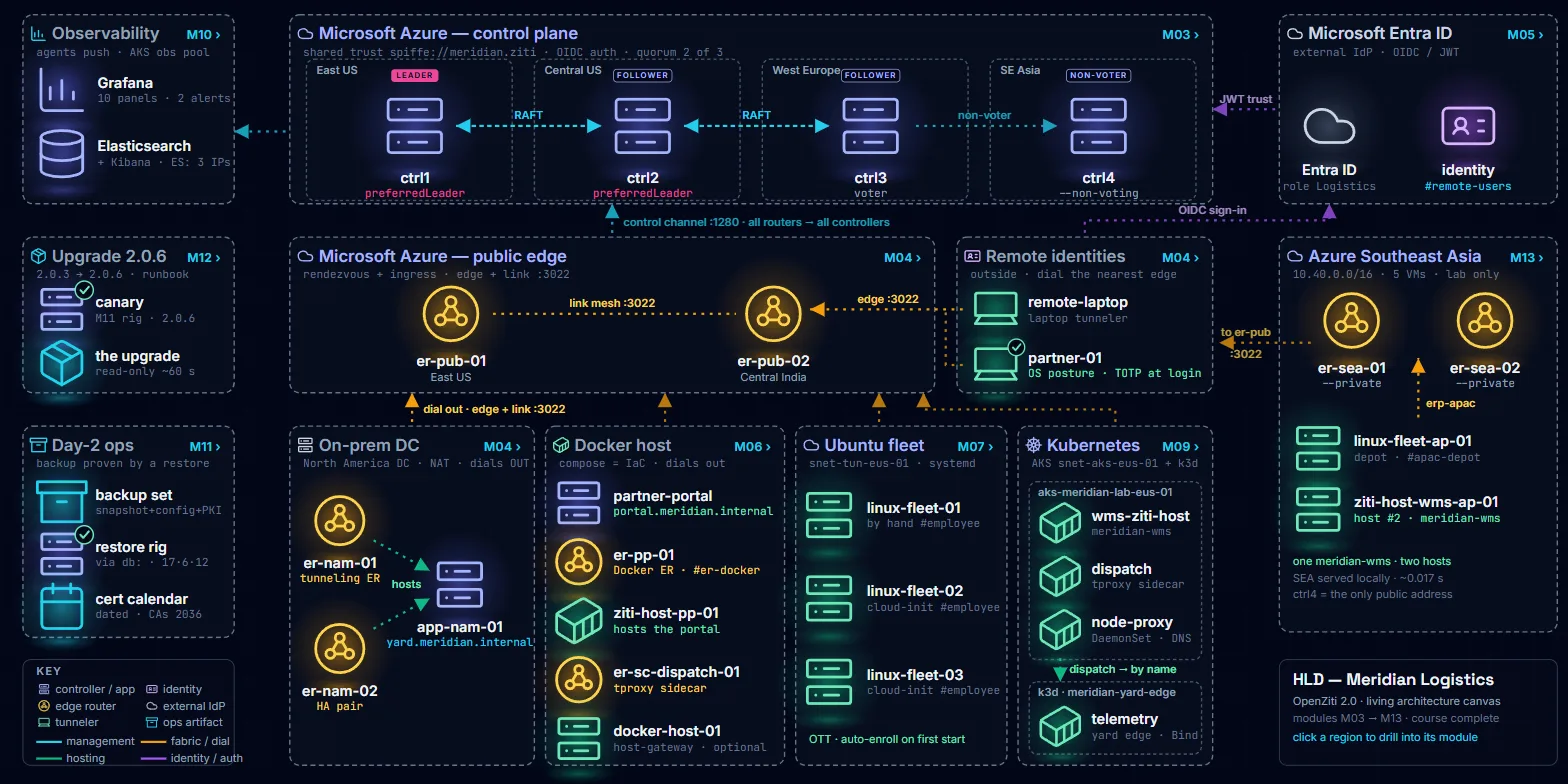
The network of Meridian Logistics
Meridian Logistics is a fictional company, and you're its network engineer. Today one compromised computer on its VPN can reach everything. You replace that VPN with OpenZiti 2.0, the open-source zero-trust network, where every connection must prove who is asking and reaches only the app it's allowed to, not the whole network.
- M03Three controllers, the machines that hold the network's list of people, apps and rules, in three Azure regions: East US, Central US and West Europe. Lose one and the network keeps working.
- M04Routers that carry the traffic: two in Azure (East US and Central India) and a pair in a private data center with no public address. Those connect outward, so nothing there is opened to the internet.
- M05Sign-in through Microsoft Entra ID (Microsoft's work-account sign-in), plus a one-time code from an authenticator app.
- M06Access rules for two groups, staff and partner companies, so each reaches only its own apps.
- M07–M09Apps on Ubuntu servers, in Docker containers and on Kubernetes clusters, with no inbound ports opened for them.
- M10Dashboards and alerts in Grafana (a charting tool), and a searchable store of network events in Elasticsearch, with Kibana to search it.
- M11–M12Backups you prove by restoring them, and a safe upgrade from OpenZiti 2.0.3 to 2.0.6.
- M13A second region in Singapore, where the warehouse system answers in both regions.
Before you start
Who it's for, and what you need
Who it's for
- You plan, design or run a network, and want people to reach only the apps they need.
- You're weighing OpenZiti, or it's already in your stack.
- You're new to zero trust, or you're an architect or DevOps lead who needs a design that survives failures across regions.
The course is open to all levels and teaches to an advanced outcome: each idea is introduced before you use it.
What you need
- An Azure subscription. Pay-as-you-go is enough if you remove the lab when you're not using it.
- Permission to register an app in Microsoft Entra ID, and ideally Owner on the subscription. With Contributor only, the Kubernetes lab's README gives a workaround.
- A computer with OpenTofu (which builds the Azure machines from text files; Terraform 1.6 or later also works), the Azure CLI and an SSH key pair. The labs are shown on Windows.
- Ziti Desktop Edge for Windows, the app that connects your computer to the network you build.
- VMware Workstation Pro (free for personal use) for the private data center, and Docker Desktop for the container modules.
- kubectl, Helm and k3d for the Kubernetes module, and the Microsoft Authenticator app on your phone for sign-in.
The lectures link the install page for each tool a lab needs. Cloud costs are in the questions below.
The 13 modules
What you can do after each module
Modules 1 and 2 explain how OpenZiti 2.0 works. From Module 3 on, every module adds a piece to the same network. Open a module to see its lectures.
M01Welcome & Course Overview
3 lectures Know what changed in OpenZiti 2.0 and how the course is laid out.
- L1Instructor Intro
- L2What's New in OpenZiti 2.0
- L3Course Agenda
M02OpenZiti 2.0 Architecture Deep Dive
4 lectures Explain how the controllers elect a leader and stay in sync (Raft), and how a router checks a sign-in token on its own.
- L4RAFT Consensus Inside the Controller Cluster
- L5The Distributed Data Model & The Router Slice
- L6JWT Auth Internals
- L7End-to-End 2.0 Control Plane & Deprecation Surface
M03Designing HA Controllers
7 lectures Build three controllers in three Azure regions with OpenTofu, then take one down and watch the network keep working.
- L8From Architecture to Action: The Brief
- L9Designing the Cluster
- L10Infrastructure as Code, in Brief
- L11Substrate Setup & Portal Demo
- L12Build the 3-Node Cluster
- L13Failure Drills
- L14Operability & Wrap
M04HA Edge Routers & Link Selection at Scale
5 lectures Stand up routers in Azure and in a private data center with no public address, and see what happens when one fails.
- L15Connect the First Site: The Brief
- L16Designing the Routers & Link Selection
- L17Build Lab: Standing Up the Routers
- L18Data-Plane Failure Drills
- L19Operability & Wrap
M05Identity, Enrollment & PKI
5 lectures Let people sign in with their Microsoft Entra ID work account plus a one-time code, and enroll machines with certificates at scale.
- L20From One Hand-Made Identity to IdP-Driven Identities: The Brief
- L21Design 1: External Authentication & OIDC
- L22Design 2: PKI & Enrollment at Scale
- L23Build Lab: Wire In Entra ID & Cut Over Enrollment
- L24Verify, Break & Wrap
M06Policies & Services
4 lectures Write access rules so staff and partner companies each reach only their own apps, with a device check on top.
- L25From a Minimal Model to Production Access: The Brief
- L26Design: Policies, Services & Posture
- L27Build Lab: The Production Model
- L28Verify, Break & Wrap
M07Tunneler Architecture — Ubuntu/Linux at Scale
3 lectures Connect a fleet of Ubuntu servers that enroll themselves the first time they start.
- L29From Hand-Made Endpoints to a Fleet: The Brief
- L30Build Lab: Stand Up & Auto-Enroll an Ubuntu Fleet
- L31Verify, Break & Wrap
M08Tunneler Architecture — Docker Patterns
3 lectures Connect apps that run in Docker containers, without opening an inbound port.
- L32From a Host Fleet to Containers: The Brief
- L33Build Lab: Host the Portal on ziti-host & Sidecar the Client
- L34Verify, Break & Wrap
M09Tunneler Architecture — Kubernetes
4 lectures Connect apps on Kubernetes, in Azure (AKS) and on a small local cluster, and reach one cluster from the other with no shared network between them.
- L35The Brief: From Containers to Clusters
- L36Kubernetes & the Manifests We Deploy
- L37Build Lab: AKS Patterns & the Cross-Cluster Finale
- L38Verify, Break & Wrap: The Track Retrospective
M10Observability — Metrics, Events & SLO Design
3 lectures Write down what "healthy" means first, then watch the network on Grafana dashboards, search its events in Elasticsearch, and get alerts.
- L39The Brief & SLO Design
- L40Design: Metrics & Events
- L41Build Lab: Wire the Observability Plane
M11Day-2 Operations — Backup & Restore
2 lectures Back up the controllers, prove the backup by restoring it on a spare machine, and know when each certificate expires.
- L42Backup & Restore: Brief & Design
- L43The Backup & Restore Lab
M12The Upgrade — 2.0.3 → 2.0.6
2 lectures Upgrade the running network one machine at a time, after a test copy, and write the runbook (the written step-by-step for next time) from what you did.
- L44The Upgrade: Brief & Design
- L45The Upgrade Lab
M13The Capstone — A Second Region
3 lectures Add a second region in Singapore by reusing what you built, with the warehouse system answering in both regions.
- L46Use Case & Design
- L47The APAC Build
- L48Thank You & Feedback
What's included
- 48video lectures in 13 modules
- PDFlab guides and slides to download
- GitHubthe lab files, public and free to read
- Webthe interactive architecture, module by module
The labs
The lab files are public on GitHub
Every lab was built and tested on real machines, in Azure and on a local PC. The repository holds the files the labs run: OpenTofu files that build the Azure machines, Docker Compose files that start the containers, and Kubernetes files. There is a folder for each module that has lab files (Modules 3, 4 and 6 to 13). No secrets live in it: you create every key and enrollment on your own machines.
- Code and settings files (everything you run except OpenZiti's own Compose files): MIT licence (free to use and change).
- Lab text, PDFs and diagrams: CC BY-NC-ND 4.0 (free to share with credit, not to sell or change).
- OpenZiti's own Compose files, included unchanged: Apache License 2.0.
- The CawachLabs name and logo are covered by neither licence.
Prep reading
Short guides for the tools the course uses
Free, plain-words guides on cawachlabs.com. Each explains one tool before the module that relies on it.
Before you start
What a terminal is
The window where you type commands, and how to read one.
Before Module 3
Infrastructure as code with OpenTofu
How the course builds its Azure machines from a text file.
Before Module 3
Linux services and logs (systemd)
How the OpenZiti programs run as services, and how to read their logs.
Before Module 5
Certificates and certificate authorities
What a certificate says, who signs it, and how OpenZiti machines use them.
Before Module 5
Signing in through an identity provider
How sign-in through Microsoft Entra ID works, and what the token contains.
Modules 6 and 8
Containers and Docker
Images, Compose files, networks and volumes, and why the course pins versions.
Before Module 9
Kubernetes, the basics
Nodes, pods, deployments, services, Helm and kubectl contexts.
Questions
Common questions
Do I need the OpenZiti 1.0 course first?
No. If you took the instructor's OpenZiti 1.0 course on Udemy, it's a head start, not a requirement. This course stands on its own and introduces each idea before you use it.
What will the cloud resources cost?
The labs run in your own Azure subscription, so Azure bills you for what you leave running. The course's own estimates:
- The three controller machines: about $50–80 a month if they run day and night.
- The Ubuntu fleet in Module 7: about $2 a day running, and about $0.50 a day deallocated (stopped in the Azure portal), at East US list prices.
- The Kubernetes cluster in Module 9: about $2 a day while it exists, at East US list prices.
- Other modules add paid resources the course doesn't estimate: two public routers (Module 4), a larger machine for the monitoring tools (Module 10), a short-lived test machine (Modules 11 and 12), and five machines in Singapore that the Module 13 lab builds and then removes.
These are estimates, and your bill depends on your region and how long things run. The Azure machines are built with OpenTofu. Between sessions, stop (deallocate) the virtual machines or destroy them. The Module 9 guide has you destroy the Kubernetes cluster between sessions, and after you rebuild it you set its apps up again. Each lab guide ends with a cleanup section that says what to do.
Which OpenZiti version does the course use?
The labs pin OpenZiti 2.0.3. In Module 12 you upgrade the running network to 2.0.6.
Is this course affiliated with OpenZiti?
No. CawachLabs is independent. The course and its labs are not affiliated with or endorsed by the OpenZiti project. OpenZiti is open-source software, and the course teaches it.
Where are the lab files?
On GitHub, at cawachlabs/oz2-zero-trust-labs, in a folder for each module that has lab files (Modules 3, 4 and 6 to 13). The lab lectures link to their module's folder.
Can I see the architecture before I enroll?
Yes. The interactive architecture shows the whole network and a detail page for each module from 3 to 13.
Build the network yourself
If you run networks, security or platforms, or you're starting out in zero trust, this is the hands-on path to zero trust with OpenZiti 2.0.